Agently, a Sintra AI Alternative: A Pragmatic Comparison for Teams Evaluating AI Employees
If you're reading this, you've probably tried Sintra AI — or you're researching it — and want to understand what else is out there. Fair enough. The AI employees space is growing fast, and picking the right platform matters because the switching cost isn't just money. It's the time you invest building knowledge bases, configuring workflows, and getting your team comfortable with a new tool.
This article compares Sintra AI with alternatives honestly. We'll cover what Sintra does well, where it struggles, and who different platforms are actually built for.
Full disclosure: this article is published by Agently, which competes in the same space. We'll be straightforward about where Agently is stronger and where Sintra might be the better fit. You can judge the comparison on its merits.
What Sintra AI Does Well
Credit where it's due — Sintra has done several things right:
Wide agent coverage
Sintra offers 12+ specialized AI helpers:
Cassie (Customer Support)
Penn (Copywriter)
Buddy (Business Development)
Dexter (Data Analyst)
Soshie (Social Media Manager)
Seomi (SEO Specialist)
Emmie (Email Marketer)
Vizzy (Virtual Assistant)
and several others. If you need narrow specialization across many functions, the breadth is there.
Benefits
Low entry price: At $97/month on an annual plan, Sintra is one of the most affordable options in the category. For solopreneurs and very small teams testing the concept of AI employees, the financial risk is low.
One-click use cases: Sintra pre-builds common workflows as one-click actions. Instead of crafting detailed prompts, you can trigger a standard task — like "write a product description" or "draft a social post" — with minimal effort. This reduces the learning curve for users who aren't comfortable writing detailed AI prompts.
Brain AI for customization: Similar to other platforms in the space, Sintra lets you add brand-specific information to customize outputs. The agents learn your context over time and adapt their responses accordingly.
Multi-language support: With 100+ languages supported, Sintra works for teams operating across different markets and geographies.
Where Sintra Falls Short
No platform is perfect. Here are the common pain points users report with Sintra:
Credit-based pricing creates friction: Sintra's plans include 250 credits per month on the standard plan. Every interaction costs credits, and complex tasks consume more. This creates a dynamic where you're constantly thinking about whether a request is "worth" the credits — which undermines the whole premise of having an AI employee that works freely alongside you. Running out of credits mid-month means either upgrading or waiting.
Individual agents vs. a unified workspace: Sintra's helpers operate somewhat independently. You interact with each one in its own context. If you're running a workflow that spans sales research (Buddy), email outreach (Emmie), and content creation (Penn), you're switching between agents and manually connecting the dots. There's no shared workspace where all agents collaborate around the same information.
Limited depth per agent: With 12+ agents, the trade-off is depth. Each helper handles its domain at a surface level — they're good for straightforward tasks but can struggle with complex, multi-step workflows that require sustained context and judgment. Breadth and depth are hard to deliver simultaneously.
Integration ecosystem: Sintra connects to Google Calendar, Notion, Facebook, Gmail, and about 15 other tools. However, the integrations are sometimes shallow — reading data rather than taking substantive action through the connected tools. The difference between an agent that "knows about" your calendar and one that can actually schedule meetings and manage conflicts matters in practice.
Team collaboration: Sintra is primarily designed for individual users. If you need a shared workspace where multiple team members interact with the same agents, share the same knowledge base, and collaborate on tasks — it's not built for that.
Agently vs. Sintra: Feature Comparison
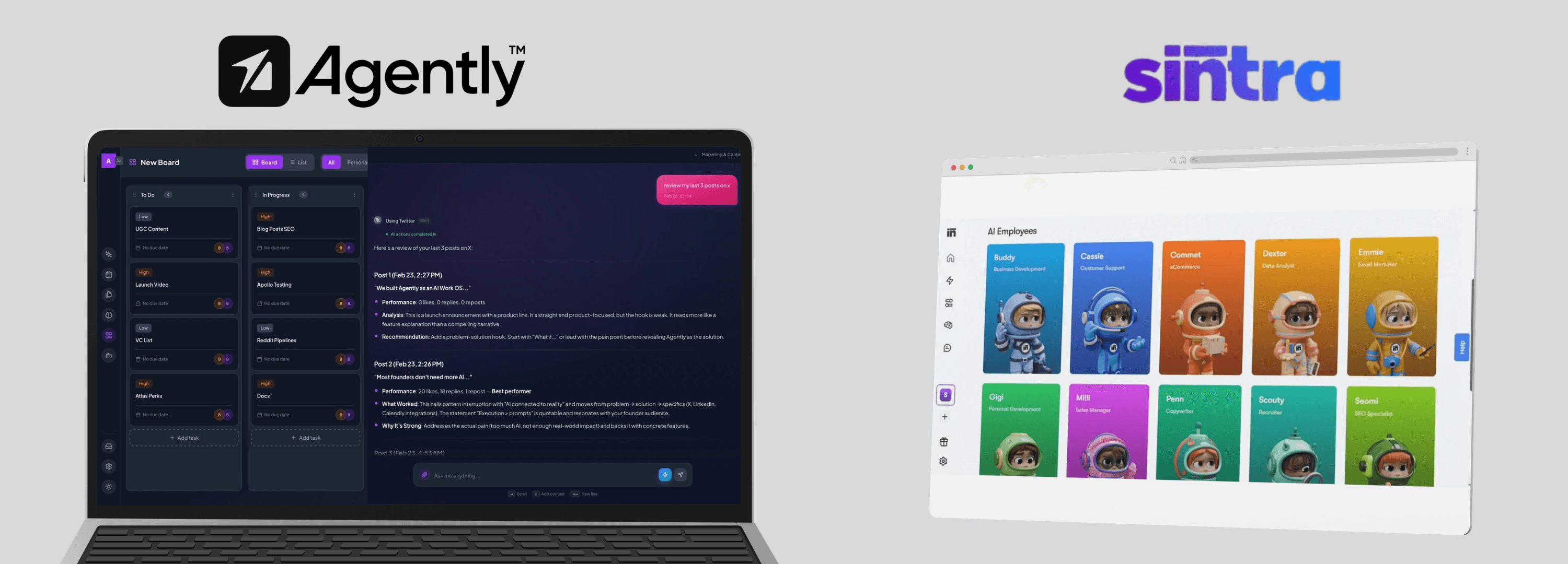
Here's a direct comparison across the dimensions that matter most:
Feature | Agently | Sintra AI |
|---|---|---|
Specialized agents | 6 vertical agents (Sales, Ops, Marketing, Support, Research, Guide) | 12+ helpers |
Pricing model | Credit-based (1,500/month on standard) | Credit-based (250/month on standard) |
Starting price | Free tier available | ~$97/month (annual, discounted) |
Workspace | Shared team workspace | Individual agent sessions |
Knowledge base | Brain (documents, snippets, web pages, images, all chat history, workspace history) | Brain AI |
Email integration | Gmail, Outlook, Yahoo + | Gmail |
Calendar integration | Google Calendar, Outlook Calendar, Calendly, Apple Calendar + | Google Calendar |
Social media | LinkedIn, Twitter/X, Facebook, Instagram, TikTok + | |
Project management | Built-in Kanban boards (Spaces) | Limited |
Document editor | Built-in (Pages) with sharing and content gating for lead/revenue generation | No |
Team channels | Yes — group chats with agents and teammates | No |
Multi-agent workflows | Agents share workspace context and output | Manual switching |
Languages | English-focused with multilingual capabilities (100+) | 100+ |
Thinking modes | Fast mode + Smart mode (extended thinking) | Standard |
Who Should Choose Sintra
Sintra is a reasonable choice if:
You want maximum agent variety. With 12+ helpers, Sintra covers more niche functions (dedicated SEO specialist, dedicated data analyst) than platforms with fewer, broader agents.
Budget is the primary constraint. Sintra's discounted annual price is among the lowest in the category. If you're testing whether AI employees add value to your workflow and want to minimize financial risk, it's an affordable experiment.
You need strong multilingual support. If your business operates across many languages, Sintra's 100+ language support is an advantage.
Your tasks are straightforward. For simple, single-step tasks — draft a social post, write an email, create a product description — Sintra's one-click use cases get the job done efficiently.
Who Should Consider Agently Instead
Agently fits better when:
You're a solopreneur working alone and don't need team collaboration features. Agently is also individual-focused design is fine for solo users to approach an efficiency of a team with AI Employees.
You're a team. Agently is built around a shared workspace. Multiple team members interact with the same agents, share the same knowledge base, collaborate in channels, and manage tasks on shared boards. If you're 2+ people, this matters.
You need agents that take real action. Agently's agents send emails through your Gmail/Outlook, create events on your calendar, post to LinkedIn and Twitter, and manage tasks on Kanban boards. Strategize autonomously, collaborate with you and your team, capture & qualify leads. They execute, not just draft.
You run complex, multi-step workflows. A single conversation with an Agently agent can span research, email, calendar scheduling, task creation, and document drafting — all connected. You're not switching between 5 different agent interfaces.
You want a unified work hub. Agently includes built-in project management (Spaces), a document editor (Pages), team messaging (Channels), and a knowledge base (Brain). It's designed to be where work happens, not just where AI generates text.
You value depth over breadth. Agents with deep capabilities, real tool access, and sustained context across complex workflows versus 12+ helpers that handle simpler tasks.
Other Alternatives Worth Considering
If neither Sintra nor Agently feels right, a few other platforms in the space:
Lindy AI — Focuses on building custom AI agent workflows. Stronger on the automation and customization side, but requires more technical setup. Good for teams that want to build their own agent logic rather than use pre-built roles.
ChatGPT Business — OpenAI's team plan provides powerful general-purpose AI with custom GPTs and 60+ integrations. It's not role-specialized like Sintra or Agently, but it's flexible and backed by the leading AI models. Best for teams that want a general-purpose AI tool rather than structured AI employees.
Microsoft Copilot — If your company runs on the Microsoft ecosystem (Teams, Outlook, Office 365), Copilot integrates directly into those tools. It's not an AI employee — it's an AI assistant embedded in your existing workflow. Different approach, but effective for Microsoft-centric organizations.
Making the Decision
The choice between Sintra and an alternative depends on a few honest questions:
Are you working alone or with a team? Solo and need basic functionality → Sintra can work. Solo and Team needing delegation→ you need shared workspace features.
How complex are your workflows? Simple, single-step tasks → Sintra's one-click use cases are fine. Multi-step workflows across tools → you need deeper integration and multi-tool agent capabilities.
How much do you value predictable costs? If credit anxiety will change how you use the tool, subscription-based pricing is healthier for your workflow.
Do you need a workspace or just an AI tool? If you want AI alongside your documents, tasks, and team communication → look at platforms with built-in collaboration. If you just need an AI that generates content → simpler tools may suffice.
What integrations matter most? Check which tools you actually use daily and whether the platform connects to them in a meaningful way (reading and acting, not just reading).
There's no universally "best" option. There's the option that fits your team's size, workflows, and budget. Take advantage of free trials — most platforms offer them — and test with a real workflow, not a toy example. You'll learn more from 30 minutes of actual use than from any comparison article, including this one.
Agently offers a free tier to test with your team. Get started and try it with a real workflow before deciding.
CEO
Omar Ghandour
February
25,
2026
Share on social media